Showing posts with label iphone 3g. Show all posts

Thursday, November 20, 2008

Nike+ iPod Nano and wireless headset

Over the last couple of years, I've been in search of my personal holy grail in terms of running-related gadgetry. In short, I've been looking for:
  1. the lightest and most compact iPod that
  2. supports the Nike+ sensor/running shoe hardware, and
  3. supports the use of a wire-free, sweatproof stereo headset
Before I describe the solution, let me briefly explain why this is hard to do.

Currently, only two members of the iPod family support the Nike+ sensor: the Touch 2G and the Nano (I have a 2G model). The smallest iPod is the Shuffle but it doesn't work with Nike+. The iPod Touch 2G comes with built-in support for Nike+ but is considerably more bulky than the Nano, plus I already have a iPhone 3G which is basically the same hardware as the Touch 2G plus a phone (and GPS). Unfortunately, the iPhone is not Nike+ compatible.

Next problem: the Nano doesn't support wireless stereo because it doesn't have a bluetooth chip. Actually, none of Apple's iPod/iPhone models can play music wirelessly even if the model happens to have bluetooth. Go figure.

This means a separate bluetooth dongle is necessary. Fact: there is only one dock connector per iPod. The Nike+ receiver uses the dock connector. The iPod Touch 2G has the Nike+ receiver built inside, freeing the dock connector for a bluetooth adaptor, but the Nano needs to have the Nike+ receiver plugged in at the bottom. Unfortunately, the headphone socket is also next to the dock connector at the bottom of the Nano. Severe competition for limited space:

I settled on a refurbished, i.e. 40% off, Jaybird JB-200 headset. It is sweatproof (very important for long-term use). It may also be ordered with an iPod-specific or a generic headphone plug dongle. (I got both.) It also has a microphone for regular bluetooth headset functionality. And mostly importantly, it also claimed a useful 5 hours of battery life, comfortably long enough for a marathon.

Even at a discount, these things are by no means cheap. And bluetooth's limited bandwidth does not make for audiophile or critical listening quality, but when I'm running do you think I care? (There are high-fidelity headsets based on Kleer's proprietary wireless system but they don't advertise sweatproofing and there are other downsides.)

Funny thing happened inbetween my placing the order and receiving the product. iLounge came out with a negative (C-) review. Given the cost, if it had come out a few days earlier, I probably wouldn't have ordered.

The headset is a bit fiddly but stayed securely put on my midweek ten mile run. And it's wonderful not to have wires to snag and yank your earbuds out.

There is a wire that connects the receiver on the right side to the left side. I had to shorten it using a tie-wrap so it wouldn't drag on my neck and interfere with head-turning.

The generic Jaybird dongle is plugged into the Nano 2g earphone socket with the Nike+ receiver inside my Marware Sportsuit Relay case (which doesn't appear on Marware's website anymore):

The Marware case is wonderful because it allow the Nano to be wrist-mounted - which is more comfortable than bicep-mounting - and is specifically designed to hold the Nike+ receiver as well. Since we've gone wireless, the constant flicking of the earphone cable is no longer a problem.

The generic dongle is about twice the size of the iPod docking connector dongle because headphone sockets don't supply necessary power, so it needs to have an internal battery. The combination looks rather unwieldy but crucially doesn't interfere with running.

Bluetooth reception from the wrist is excellent without annoying interruptions. (Placed in a pocket, you will get dropouts as body parts may temporarily block the signal while running.) Sound quality is running compatible: certainly, the Nike+ voice announcements come through loud and clear, and music does not require a low noise floor given labored breathing.

As for the iPod-specific dongle, I use that with my iPhone 3G for music only. The built-in bluetooth of the iPhone is only for calls.

There are a lot of pieces to lose. Here is the docking station for charging both the headset and the generic bluetooth dongle:

UPDATE: November 24th, I had some problems with the increase volume button, it seems stuck on, As of November 25th, the headset is dead. It charges (red light goes on and then off), but it doesn't turn on anymore.

Sunday, September 7, 2008

One thousand miles (and Griffin iTrip Autopilot review)

One thousand miles. To be a prisoner inside a steel cage for 14 hours with a singular focus on piling up the miles, listening to tunes.

Driving from Tucson to Boston back in January took me just over 4 days. I averaged a very comfortable 650 miles a day.
(See my blog entry and mile/fuel stats here.)

So why a thousand miles?

Well, on my return from Boston to Tucson, I lost a rear tire to debris and a travel day due to I-81 southbound being completely closed.

With the beginning of the semester approaching, I had to make up time. Heading west from just east of Little Rock AR after breakfast I managed to make it all the way to Las Cruces NM in 14 hours for an average of nearly 72 mph including stops.

Yup. A cool thousand, including all the way across Texas:

1000 miles and 14 hours wouldn't have been realistic parameters in the crowded Northeast but in the vast emptiness that is Texas, one can just set the cruise control and listen to music. Well, there was heavy stop-and-go traffic going through Dallas but that was the only trouble spot I encountered.

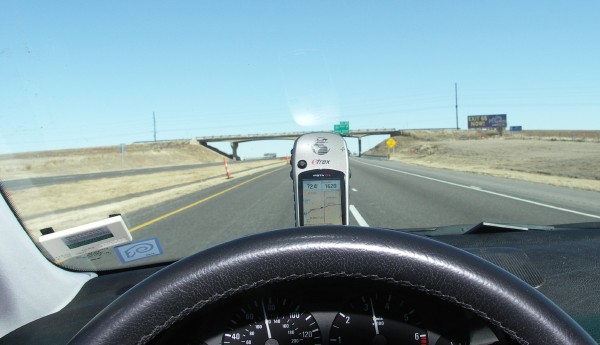
Speaking of music, I used my iPhone 3G for both iPod functionality and GPS navigation on this trip. Mounting options include simply placing the phone sideways in the instrument binnacle (displaying GPS-enabled Google maps):

or using a generic vent mount (from aWalmart Supercenter) - here in iPod mode:

Compare this to what I did with my Garmin Etrex back in January here.)

To interface with the aux input-free Harman Kardon sound system in my car and to feed the battery-hungry beast that is the iPhone 3G, I used a Griffin iTrip Autopilot FM radio transmitter and charger that I purchased at the Cambridgeside Apple store for this purpose. A vital accessory on a 14 hour day.

I was pretty happy with the FM transmitter part because the iTrip Autopilot can be set in extended FM frequency range (76.0-108.0MHz) for international (i.e. non-US) use. Furthermore, my car was sold in multiple markets with the same radio/cd player. This means the radio can be rebooted in Japan FM mode (76.0-90.0 MHz) via the service menu and tuned down to an empty 76.0MHz here in the US. The sound quality is markedly better than in the regular noisy FM band here.
(For those of you who are not familiar with car radio FM transmitters, settling on an unoccupied, i.e. interference-free, frequency on FM can be a rather frustrating experience.)

BMW Business CD service menu access: turn radio off then on. Hold down the m button for ten seconds, +/- buttons to find Area, preset 1 to flip through the areas, select Japan, then +/- reboots.
Griffin iTrip Autopilot extended frequency range: hold down center key until logo shifts position.

Unfortunately, I was less happy with the charging function of the iTrip Autopilot. To my dismay, my iPhone actually discharged despite being plugged in!

I opened a ticket with Griffin Tech Support:
[ME] Unfortunately, I've discovered there is a big problem with the itrip autopilot. Sometimes it doesn't give enough power to the iPhone 3G, esp. when the maps/gps is running and the ipod functions are playing to charge the iphone 3g. Worse still, when these functions are running, the iphone 3g actually discharges! As a result, i get warnings that it's down to 20% power etc. when I started with a full charge before plugging it into the itrip autopilot.
The reply?
[Technical Support]This will happen if the iPhone is running multiple applications like you are on your trip. If you dim the iPhone screen a little, this will help. A good analogy would be... you're burning gas faster than you can fill up your tank. Does that make sense?
Follow-up:
[ME]but I thought you'd have a version with a beefier power supply for the iphone 3g. It's wierd to plug it in and end up with a discharged battery. Like if I plug in my macbook and run lots of applications, I don't expect the batttery to run down.
I gave up after the next reply:
[Technical Support]True, but its much different when you're talking about AC compared to DC. Thank you.
Well,in my opinion this is a product defect. All I have to say is watch out if you buy the iTrip Autopilot: you may end up with a discharged iPhone 3G because the power supply is too wimpy and there is no warning of this anywhere in the product packaging.

Monday, August 25, 2008

Another tri-state area

When one hear the term Tri-State Area or Region, I believe most people think of the well-known New York-New Jersey-Connecticut (NY-NJ-CT) tri-state region. Well, at least the two are synonymous for me probably because I've spent ten years living in Jersey.

Of course, other tri-state areas exist but I was astonished to discover there are actually as many as 38 officially-marked "tripoints" in the United States. Moreover, the NY-NJ-CT tri-state region does not actually possess a tripoint. (See this authoritative Wikipedia entry.)

Last week, I visited one of these real tripoints on my drive home from Boston to Tucson. As seen on my iPhone 3G map display, this is where Virgina, Tennessee and Kentucky meet. (The blue GPS blob marks the point where I was standing.)

Although it's a nice 1.2 mile walk up to the Tri-State Peak located inside the Cumberland Gap National Historical Park, it's a bit of a disappointing hike: trees and other vegetation block any chance of a scenic view.

Nestled in a clearing lower down, however, is the surprisingly photogenic (almost Mayan temple-like) remains of an Iron Furnace:

Given my recent interest in 360° spherical panorama photography (see recent blog entry tech and subjects: The Stata Center and The Getty Museum Los Angeles), I couldn't resist the opportunity to make a panorama at this spot. Download here. (Warning: 12.1MB file. You can view this using Quicktime player.)

Anyway, I was here to visit my good friend Jim Montgomery who has recently moved to this hilly and very rural - let's just say dining-opportunity-limited - corner of southwestern Virigina bordering Kentucky and Tennessee. The upsides are the gorgeous scenery and almost empty roads in pristine condition (a consequence of the lack of real winter, population and truck traffic I reckon). In short, a perfect "secret" location for bike training. On Jim's porch:

jim led me on a perfect 25 mile training loop from his home in Rose Hill VA with about 1700 ft of climbing. The GPS tracklog recorded on my Garmin eTrex Vista Cx:

I wish I had more time to explore the region on my bike but the start of a new semester in Tucson cannot be delayed. For example, the Cumberland Gap tunnel "crosses" - or is it also appropriate to use the semantically-bleached terms "bridge" or "thread"? - the mountain ridge that can be seen in the background. In particular, I'd like to try the (presumably abandoned) mountain road it replaced. Another Wikipedia entry states:
The tunnel replaced a 2.3-mile (3.7 km) stretch of U.S. 25E between Middlesboro, Kentucky and Cumberland Gap, Tennessee that became known as "Massacre Mountain" due to the large number of travelers killed on the twisting mountain road over the Cumberland Gap pass.
Anyway, some pictures from the ride are shown below - I'd have to rate the route as equal or better to my favorite Valley Forge PA area hill route I used to ride but without the traffic and with far better roads.


Tuesday, July 29, 2008

iPhone 3G experience

I bought an iPhone 3G this morning to replace my broken Verizon Wireless (VZW) Motorola E-815.

Here it is sitting next to a 9.5mm 2.5" 320GB (laptop) portable hard drive and my defunct Motorola phone.

I ported my number over from Verizon. It took a few hours and a support call to ATT Wireless. I've been a Verizon customer for probably 15 years plus. So long Verizon.

I checked the iPhone 3G availability table last night. I wanted the 16GB model in black.

Felt it was a bit ridiculous to be standing in line at 8:30am at the Cambridgeside Apple store just to buy a phone that wasn't even on sale. The lady behind me in the line reassured me it was okay: nothing to be embarassed about, nobody's around in the mall this early. She was waiting in line to get the iPhone 3G 16GB in black for her husband. Same one I had my eye on. I wasn't the only one in line wondering just how many they had left.

Anyway, I got the phone around 9:30am. ATT Wireless handled the porting, without me having to contact VZW directly, once I gave them my VZW account and SS numbers. But I didn't get the "port completed" text message on my new phone (allowing me to receive calls) until noon. When I called ATT at 11:30am, I was told the delay was because I hadn't turned off my old phone.

Setup

Since I had a .mac (now MobileMe) account already, the setup was incredibly slick. It grabbed my contact information, iCal, Mail server settings and browser bookmarks sans intervention. I also synced my iTunes library. One reason I paid more for the 16GB model was that it could store more albums than my 8GB (Gen2) Nano.

I get all my email just like on my Macbook. Viewable PDF attachments and everything. It's set up to Push sync rather than poll with my .mac mail but the other two mail servers I use at Arizona and MIT are Fetch (poll) only.

If I add a new event to my calendar it's transparently and automaticaly synchronized with my computer. For appointments, this is handy and great.

The level of integration from just these two features make the phone truly useful for me. The $299+tax price tag means it's not inexpensive by any means but the humble cellphone has taken a huge step in usability for me.

There are other bells and whistles. As far as I can tell, A-GPS is cool and fast too. I wonder if it's better than my little Garmin Etrex Vista CX (which has all the roads in the US preloaded).

The iPhone 3G experience with ATT isn't completely seamless though. For example, they sent me an email:

Unfortunately, you can't redeem the ringtone coupon since the iPhone is not a listed phone on ATT mediamall! (That saved me from downloading Abba's Dancing Queen as my ringtone.)

I called ATT to point this out. They gave me a $2.49 credit on the account to facilitate buying a ringtone on iTunes.

Unfortunately, since I'm in Boston for a few more weeks, I can't check the ATT Wireless coverage back in Tucson. That's a risk I have to take. From the maps below, I'm hoping it's as good as VZW. Nothing would be more frustrating than a state-of-the-art phone that works everywhere except between home and work.

Voice coverage (darker is better):

3G data coverage (in blue):