Showing posts with label ipod nano. Show all posts

Thursday, November 10, 2011

Just 3 miles

I ran just 3 miles around the campus this evening. And suffered horribly. As the students disappeared into the distance ahead of me, I immediately rued my training neglect.

(Last time I posted about running outdoors it was September 2nd. See A Sunset Run.)

As the graph above from my iPod Nano shows, I only managed to last 4 mins at 14 km/hr (8.5 mph) before slowing down to run at my own pace (a bit under 13 km/hr, or just below 8 mph). Have to say this is a pretty good loop around campus.

I could say I am 10lbs heavier than optimal and lack training miles. But the fact is, I'm old and my legs just can't implement what my brain wills it to do anymore. I'm fundamentally slower and need to take my time. As I completed the loop around campus, I was simply happy my lungs and legs held out for the distance. Average pace 7'38" per mile. To my surprise, my iPod congratulated me on a new benchmark 7'22" mile. Ya take what ya can get.

Friday, September 2, 2011

A sunset run

Today, we move to a new phase of my run training for this season. I did my first outdoor run today at 6pm. That's the time the university recreational running club meets on a daily basis.

So far I've only been running indoors on a treadmill: the simple reason being that even at 6pm it's still 37C (100F) outside at the moment.

6pm has its advantages though. The sun sets as the run proceeds. And this Friday's run is special: the club has decided to do one of my favorite runs on campus, namely the Parking Garages Run at the university. The idea is conceptually simple and beautiful in its implementation.

We run from multistorey parking garage to multistorey parking garage at sunset. These are dotted around the university. At each garage, we run up and down the stairs and across the rooftops. And if one is not in too heavy an oxygen debt to notice, one can catch a good view of the sunset and its colors at each location.

Here is a "bird's eye view" of the loop. Starting from the university Rec Center, we trace a clockwise route around the main campus visiting the 6th St garage, then Tyndall and the Main Gate garages, cut across campus and tunnel under Speedway to do Park Ave and Highland garages, then tunnel back under Speedway and finish with the 2nd and Cherry St garages. Oh, plus down and up the ILC (Integrated Learning Center) steps which - strictly speaking - is not a garage, and actually descends underground. Total distance is about 2.7 miles but that doesn't include running up and down the stairs at each garage twice. My iPod nano reports 400 kcal and and an optimistic total of 3.7 miles in just under 35 minutes.

Running in 100 degree heat is quite a challenge, not to mention the motivation of trying not to get totally left behind by the running club students. As a result, my max heart rate (HR) hit 170 bpm by the end. I must admit I felt quite out of shape. Still, it's a great run and as beautiful as one can get on this large and crowded campus.

Thursday, December 9, 2010

Heart Rate Drift and Rate of Perceived Exertion

I'm what you might call a bit of a data junkie, but curiously enough I normally don't use a heart rate (HR) monitor. Let me explain.

On my road bike (or Computrainer stationary trainer), I have a powermeter that measures my output wattage (or workload). On the treadmill, I simply run at a fixed speed. For a given workout, I set the target wattage or treadmill speed manually and doggedly stick to it. Based on the rate of perceived exertion (RPE), I adjust the workout if necessary for next time. The HR falls wherever it may.

But that was before I acquired an iPod Nano 6G back in September (see blog post here). The 6th generation Nano not only records foot pod data but also can simultaneously record HR. Since then, I've been wearing my HR strap on treadmill workouts.

I ran twice earlier this week (Monday and Wednesday) on a treadmill in a very large, climate-controlled gym. There is a completely predictable and repeatable 20 beats-per-minute (bpm) rise in HR over the 50 min or so endurance run. See how remarkably similar the two profiles look below.

[Conditions: The treadmill speed was fixed to a lowly 7.0 mph (11.25 km/h) throughout each entire workout. (There is also a 5 min warm-up before the start that's not shown here.) The climate conditions in the gym were unchanging and perfect throughout. Also, I took a sip of water every 5 minutes like clockwork.]

So the HR drifts. Observable phenomenon confirmed. But what about perceived exertion?

Well, perceived exertion is actually also another pretty dodgy fish. Perhaps it's generally correlated with breathing rate in running but I'm not sure. But initially, I've noticed my RPE is relatively high during the first 10 minutes (despite the 5 min warm-up). I don't feel efficient. But I'm not breathing hard. After that, the RPE actually drops despite the HR steadily drifting upwards. I feel I am in the groove, so to speak. Nearer the end of the workout, I've noticed when my HR hits 168 bpm or so, I start to feel the RPE go up again. However, in neither workout did I exercise to exhaustion, or have to reduce the treadmill speed to accommodate fatigue.

So what can I conclude? If I go by RPE, I'd be adjusting the treadmill speed down, then back up and back down again. If I go by HR, I'd be steadily reducing treadmill speed as the workout proceeds. In the end, I think all of this is really just data for data's sake. There's a lot to say for just ignoring these indicators, beloved of coaches and exercise physiologists, i.e. leave those two up and down buttons alone, and just doing the damn workout and burn your way through those 700 kcal.

Tuesday, September 14, 2010

iPod Nano 6g

There can be a manufactured silver lining in every cloud.

For example, last weekend, I misplaced my iPod Nano (4g: 4th generation) that I use to record my runs using the Nike+ sports kit. I'm also out of shape, read: can't run 10K under 45 minutes anymore, and need some retail therapy to jumpstart my training.

Coincidentally, last week Apple released the new 6th generation (6g) iPod Nano which advances on my now-lost 4g Nano in two distinct ways:
  1. It's much smaller and has a clip much like the previous generation Shuttle. It's square and is all touch screen. No more iPod iconic click/scroll wheel. Feels like half the size and weight of the previous (rectangular) Nano. Read: easier to carry on runs.

    (Incidentally, the Shuttle has never been Nike+ Sports kit compatible.)
  2. It's also compatible with the Polar Wearlink+ Heart Rate (HR) monitor strap. The 4g wasn't. (The 5th generation (5g) Nano was also compatible, but I skipped the 5g.)
The major downside of course is that I'm out a total of $266 after tax. For that, I got the base model 8GB Nano $149 plus the $29 Nike+ sports kit, plus the $70 for the Polar Wearlink+ strap.

(Incidentally, you need a very special Polar Wearlink+ strap that transmits on two separate frequencies 5 kHz and 2.4 GHz. Only one of the frequencies is used by the Nano (2.4 GHz) but it transmits on both simultaneously. Regular 5 kHz Polar HR monitors don't transmit on the frequency needed by the Nano. Yes, it's only the most expensive model that has the red Nike+ logo on the transmitter.)

I think the square shape is great and I'm all for minimalism. But of course, the overall effect is spoiled by having to insert that big white Nike+ dongle into the dock connector. (On later iPod Touch and iPhone 3GS onwards, the dongle is unnecessary.)

Another (post-purchase) downside I discovered over the 4g is that the 6g only displays the time elapsed during a Basic Run. The screen is nearly the same size, I wonder why they deleted the extra useful real-time information in the Nike+ application.

Unfortunately, to get to that other information being recorded, e.g. pace, distance and HR, it's necessary to be wearing earphones and to press the Sleep/Wake button to get a voice readout. Well, at least one can get the cute Heart logo and stats in the summary after End Workout.

My Nike+ account now also has that cute Heart displayed on runs that have recorded HR.

Unfortunately, recorded HR makes for some extremely weird-looking and virtually-impossible-to-interpret, totally physical-universe-defying run pace graphs.

Oh well. Two steps forward and one step back in functionality.

Thursday, November 20, 2008

Nike+ iPod Nano and wireless headset

Over the last couple of years, I've been in search of my personal holy grail in terms of running-related gadgetry. In short, I've been looking for:
  1. the lightest and most compact iPod that
  2. supports the Nike+ sensor/running shoe hardware, and
  3. supports the use of a wire-free, sweatproof stereo headset
Before I describe the solution, let me briefly explain why this is hard to do.

Currently, only two members of the iPod family support the Nike+ sensor: the Touch 2G and the Nano (I have a 2G model). The smallest iPod is the Shuffle but it doesn't work with Nike+. The iPod Touch 2G comes with built-in support for Nike+ but is considerably more bulky than the Nano, plus I already have a iPhone 3G which is basically the same hardware as the Touch 2G plus a phone (and GPS). Unfortunately, the iPhone is not Nike+ compatible.

Next problem: the Nano doesn't support wireless stereo because it doesn't have a bluetooth chip. Actually, none of Apple's iPod/iPhone models can play music wirelessly even if the model happens to have bluetooth. Go figure.

This means a separate bluetooth dongle is necessary. Fact: there is only one dock connector per iPod. The Nike+ receiver uses the dock connector. The iPod Touch 2G has the Nike+ receiver built inside, freeing the dock connector for a bluetooth adaptor, but the Nano needs to have the Nike+ receiver plugged in at the bottom. Unfortunately, the headphone socket is also next to the dock connector at the bottom of the Nano. Severe competition for limited space:

I settled on a refurbished, i.e. 40% off, Jaybird JB-200 headset. It is sweatproof (very important for long-term use). It may also be ordered with an iPod-specific or a generic headphone plug dongle. (I got both.) It also has a microphone for regular bluetooth headset functionality. And mostly importantly, it also claimed a useful 5 hours of battery life, comfortably long enough for a marathon.

Even at a discount, these things are by no means cheap. And bluetooth's limited bandwidth does not make for audiophile or critical listening quality, but when I'm running do you think I care? (There are high-fidelity headsets based on Kleer's proprietary wireless system but they don't advertise sweatproofing and there are other downsides.)

Funny thing happened inbetween my placing the order and receiving the product. iLounge came out with a negative (C-) review. Given the cost, if it had come out a few days earlier, I probably wouldn't have ordered.

The headset is a bit fiddly but stayed securely put on my midweek ten mile run. And it's wonderful not to have wires to snag and yank your earbuds out.

There is a wire that connects the receiver on the right side to the left side. I had to shorten it using a tie-wrap so it wouldn't drag on my neck and interfere with head-turning.

The generic Jaybird dongle is plugged into the Nano 2g earphone socket with the Nike+ receiver inside my Marware Sportsuit Relay case (which doesn't appear on Marware's website anymore):

The Marware case is wonderful because it allow the Nano to be wrist-mounted - which is more comfortable than bicep-mounting - and is specifically designed to hold the Nike+ receiver as well. Since we've gone wireless, the constant flicking of the earphone cable is no longer a problem.

The generic dongle is about twice the size of the iPod docking connector dongle because headphone sockets don't supply necessary power, so it needs to have an internal battery. The combination looks rather unwieldy but crucially doesn't interfere with running.

Bluetooth reception from the wrist is excellent without annoying interruptions. (Placed in a pocket, you will get dropouts as body parts may temporarily block the signal while running.) Sound quality is running compatible: certainly, the Nike+ voice announcements come through loud and clear, and music does not require a low noise floor given labored breathing.

As for the iPod-specific dongle, I use that with my iPhone 3G for music only. The built-in bluetooth of the iPhone is only for calls.

There are a lot of pieces to lose. Here is the docking station for charging both the headset and the generic bluetooth dongle:

UPDATE: November 24th, I had some problems with the increase volume button, it seems stuck on, As of November 25th, the headset is dead. It charges (red light goes on and then off), but it doesn't turn on anymore.

Thursday, April 10, 2008

the imprecision of measuring devices

Question: you have multiple measuring devices, which do you trust?
(Answer is none.)

Here's the story. Today was a beautiful day. 70F and sunshine.

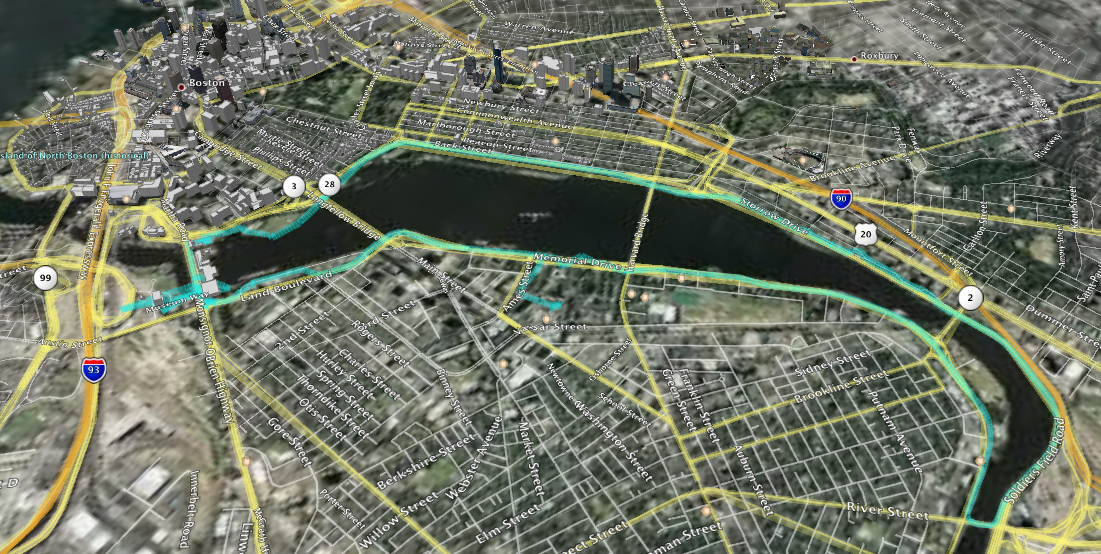
I just ran the Charles River loop between the Museum of Science and River St bridges fully instrumented.

Full image here

This is the route recorded by my Garmin Etrex Vista Cx in my back pocket. I also had my Apple iPod Nano with the Nike+ kit.

The Nano computes speed/distance by measuring foot strike time. It overestimates my distance by about 5% usually. But I don't bother to recalibrate it because it would depend on the running surface: treadmill, grass, hard mud, gravel, tarmac, concrete all affect the foot strike time differently.

Clearly, there are some issues with the GPS data points recorded. I'm pretty sure I can't run at nearly 30 mph.

Zooming in at the Museum of Science reveals some oddities:

According to the tracklog, I've been doing some impossible zipping around. Of course, we need to delete those outlier points. Google Earth then reports:

The Nike+ kit doesn't record every footfall. It saves a reading every 2 seconds and performs lots of smoothing:


Finally, there is a well-known reference guide to this course (probably obtained by someone with a measuring wheel):

Summarizing, we have:
Source Distance
(miles)
Garmin tracklog 9.66
Google Earth 8.9
iPod Nano Nike+ 8.13
My best estimate 7.6
Reference table 7.0

I didn't run the exact reference course, which is a good lower bound.

Additional mileage included running from the MIT Stata Center out to Memorial Drive. (Plus I had to double back at one point since a gate was locked.)

So I can't rely solely on the reference table.

Lesson? The GPS isn't too reliable in this urban environment. As it turns out, the lower tech device (Nike+ kit @ $30 + iPod Nano) is closer to the ground truth.

The possibility of bad track points (e.g. from interference) means that on a short run you have to inspect the GPS tracklog that's recorded. Wish there was filtering software built into the Garmin.

Monday, May 7, 2007

Excel and the Nike+ iPod Sport Kit

As I've mentioned in a previous blog entry (On the treadmill), it's possible to extract the run data recorded by the Nike+ iPod Sport Kit and plot it yourself.

One advantage of this is that you don't get the overly smoothed plot from the Nike+ uploads.

Here are the steps. First, I assume the iPod nano has been synced (and the data automatically uploaded to the Nike+ website).
  1. Extract the file.
    The iPod nano must have disk mode enabled. Assuming MacOSX, extract the file:

    /Volumes/iPod name/iPod_Control/Device/Trainer/Workouts/Empeds/ID of footpod/synched/Date Time.xml (where iPod name and ID of footpod are installation-specific).

  2. Identify the part of the file that contains the raw data.
    For example:
    <extendedDataList>%ltextendedData dataType="distance" intervalType="time" intervalUnit="s" intervalValue="10">0.0, 0.0141, 0.0337, 0.0702, 0.0917, 0.1221, 0.1556, 0.1887, 0.2211, 0.2508, 0.2813, 0.3122, 0.3402, 0.3723, 0.4045, 0.4361, 0.4647, 0.4968, 0.5274, 0.5586, 0.5871, 0.6157, 0.6474, 0.6643, 0.6866, 0.7107, 0.7401, 0.7731, 0.8005, 0.8309, 0.8589, 0.8895, 0.9169, 0.9488, 0.9807, 1.0087, 1.0397, 1.0705, 1.1016, 1.1224, 1.1534, 1.1837, 1.2154, 1.2431, 1.2706, 1.3065, 1.3351, 1.3652, 1.3963, 1.4234, 1.4486, 1.4773, 1.5029, 1.5266, 1.5509, 1.5752, 1.6026, 1.6311, 1.656, 1.6835, 1.712, 1.74, 1.7689, 1.7905, 1.8183, 1.8401, 1.8607, 1.8896, 1.9205, 1.949, 1.9751, 2.0041, 2.0334, 2.0634, 2.091, 2.1256, 2.1573, 2.1895, 2.2188, 2.2516</extendedData> </extendedDataList>
    Each of these values represents the distance traveled in 10 seconds. Save the data only as a text file.

  3. Import the comma-separated list of numbers into Excel. The values 0.0 to will appear in a single row (row 1).

  4. Transpose that row. Select row. Copy. Select cell A2. Paste Special. Check Transpose.

  5. Delete original row (row 1) and replace it with a blank row. Enter for A1, A2 and A3: km, time (mins), and speed (mph), and zeros for B2 and B3. See below:

  6. Populate columns B and C.

    Formula for cell B3 is simply the value of the previous cell (B2) + 1/6 of a minute, i.e. ten seconds. Copying this for the whole column gives the time in minutes.

    The speed in mph for cell C3 is simply the distance traveled in 10 seconds (i.e. A3-A2) multipled by 360 (convert to hours) and by 0.621371 (convert km to miles). Copying this for the whole column gives the speed in mph.

  7. Plot the chart.

    Select columns B and C. Insert Chart. Select XY scatter (connected by lines).

    Take the defaults and you have a detailed chart.