Thursday, February 14, 2013

Nike+ and Matlab: part 2

In an earlier post, I described my first efforts at writing functions for using my iPod Nano with Matlab (here). As I pointed out, that wasn't functionality that I was really missing; in other words, I could do the same with Excel, though not with the Nike+ website.

Because that Matlab is such a powerful interactive and programming tool, it's easy to add functionality when you think of a new need. For example, yesterday I ran for 36 minutes, divided into a 10 min easy warm-up, and 26 mins at pace. The Nike+ website gives me:


which doesn't quite reflect the nature of my workout. Instead, what I want is the following:


This graph makes a lot more sense. You can see I have marked the average speed for both the first 10 mins (10.4 km/h) and the subsequent section (11.9 km/h) separately. I have overlaid the plot (raw and smooth) with the averages for the two sections as horizontal lines in blue.

To plot the recorded data, I simply call the nike function from last time:


Note, I've modified the call (and code) a bit to return both the number of data points collected and the array itself. (This is because I'm going to massage the data a bit.) At this point, I notice that there are a few blips in the data. There are two recorded data points that say I'm running at 60 and 80 km/h, respectively - which of course, is absurd. These data points will affect the average speed recorded, so I'll want to remove them by running another function that I wrote for the purpose, called rmoutliers:


It returns n, the number of outliers detected, and the modified array (a). Here, n=2 and all is well. How did I define what constitutes an outlier? Well, I crudely decided that 3 standard deviations away from the mean would count. Here is the code:


Notice I simply decided to replace those outlier points with the mean. (I could do something different and a bit more realistic, like use a moving average, of course.)

Finally, I want to overlay my average speed for the first 10 minutes and the rest of the run. We can add another function plotavg as follows:


I wrote this to say plot the average for mins 0 through 10. And then the average for mins 10 through 36. And in both cases, tell me what the average was for the defined segment. The code is very simple:


The end result is:


This functionality is simply not possible using a program with a simple, fixed menu of options because there will always be more things you'd like the program to have that you didn't think of initially. And one might be reluctant to dig into code and recompile an updated application just for one more function. But because Matlab is so programmable, these tasks are easy to do even on one-time basis.

Wednesday, February 6, 2013

Learning by doing: Nike+ and Matlab

I subscribe to the view that the best way to learn a complex and powerful tool or programming language is by doing.

Matlab is particularly nice for dealing with quantitative data. I decided to dive deeper into the tool by coding up a graphing application for my treadmill workouts recorded using the Nike+ application that samples data from the built-in accelerometer of the iPod Nano.

This is not necessarily functionality that I'm currently missing; normally I use Excel or the Nike+ website (based on Adobe Flash). Perhaps Matlab is overkill, but there's something deeply satisfying about smoothing the accelerometer data using just one function call like:

c = smooth(b);

where b and c are vectors. The default is a simple moving average (span 5). But because it's Matlab, you can play with many different smoothing options:


I'm looking to produce a graph like this automatically:


We have three graphs overlaid on top of one another; I'm plotting speed against time:
  1. the raw data (in gray),
  2. the smoothed data (in thick red), and
  3. the treadmill speed setting (in blue)

When the iPod Nano is attached to my Mac, the raw xml file for my workout looks something like this:


The Nano records a datapoint, the cumulative distance in km, every 10 seconds.

We can grab those raw distances between the <extendedData dataType="distance"> and </extendedData> tags using a simple 3 line Perl program, as Matlab is perhaps not the best tool for this job:


The cool thing though is that Matlab can call Perl to stick the distances in a file (distances.txt):


perl('getdistances.perl',f)


Then we can call the importdata function to read those distances into an array (a):


a = importdata('distances.txt');


To extract the speeds in km/h units, we do a little conversion from our raw cumulative distances in km/10 sec units. It's a shame that the MuPad (symbolic math) part of Matlab is not well-integrated with Matlab proper because the unit::convert system there is cool. For example, you can define your own units like km/10 sec. (Anyway, I couldn't figure out how to make MuPad and Matlab work together.) Fortunately, the function convvel (convert velocity) can do km/s to km/h.

Finally, the rest is just plotting the data points. Setting a few labels and the ticks on the graph. I packaged this whole sequence up in a function called nike and saved it in Documents/Matlab/nike.m:


To use the graphing, I just call the function nike with the xml filename recorded by the iPod. (Matlab knows to look for this function in Documents/Matlab by default.) The call to nike (see below) returns the number of data points (181).


And up pops this graph:


This only works well when I have Matlab already open. For some reason, on my Macbook Pro, Matlab takes forever to start up.

There is a second call above to a function called treadmill, which handles the overlay of my treadmill program onto the iPod data.

I supply a vector [7,15,7.5,5,7,5,7.5,5] describing my workout: this means first 7 mph for 15 mins, followed by 7.5 mph for 5 mins, followed by 7 mph for 5 mins, and finally, 7.5 mph for 5 mins, for a total of 30 minutes. Note this is America, so the treadmill is in mph and I use convvel again to flip the values to km/h. Function implementing this is stored in Documents/Matlab/treadmill.m:


And I get my overlay:


Now, what's also cool about Matlab is that it's both interactive and programmatic. So, after running those two functions, I can simply click on the y-axis and zoom into where I want, resize the graph, add a few more labels, and put up a legend. The result:


So nice and easy.

Actually, the Adobe Flash-based graph from the Nike+ website is not bad either (although we can't have overlays):


Thursday, July 19, 2012

Olympus TG-1 and Olympus Hong Kong Service Center

Although my new fancy Olympus OM-D E-M5 (see here) has some professional features: in particular, it has weatherproof seals, it is not waterproof. The fast Lumix f/1.7 20mm lens also has no weatherproof seals. Last time I went water drifting, I had to use a thick plastic transparent bag designed to keep cameras dry. At around $30, a relatively cheap solution.


However, two problems immediately present themselves: (1) you have to shoot through low quality plastic, compromising the image quality (see above), plus there is constant fogging of the plastic bag due to humidity, messing up the focus occasionally, and (2) pressing buttons and turning dials through a plastic bag is not ideal. Although the E-M5 has class-leading built-in image stabilization and the Lumix lens is fast, with all the bouncing around, and difficulty with framing through a plastic bag, I ended up with not so many keepers.

So I was on the lookout for a true waterproof high-quality compact camera with a fast lens. Such a camera wouldn't need plastic bag waterproofing and would be designed to take a few bumps.


Coincidentally, this summer Olympus just brought out the TG-1, which has a much advertised fast f/2.0 lens and is waterproof to 12m (40ft). (Shockproof to a 2m/6.6ft drop and good down to -10C/14F, though the battery life probably takes quite a hit.)

Unfortunately, it was out of stock everywhere, and it took me a month to acquire one. It's still out of stock nearly everywhere, but I managed to pick one up today. Had to pay full list price but they threw in an 8GB SD card as a tidbit. I was surprised a (red) semi-hard shell case is included. Plus two straps (one that floats, one normal).

It can also take add-on fisheye and telephone lenses. These are not available yet.


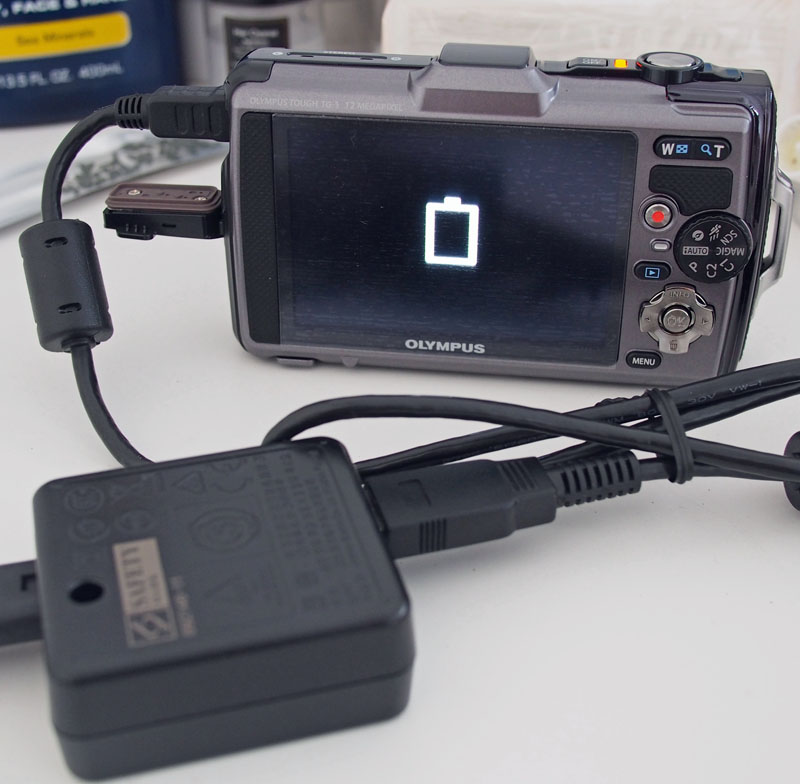
It has a rather strange USB charging system. Basically, the battery is charged inside the camera. You attach a USB cable to a small square box. The box in turn plugs into the wall using another cable. A small led lights up yellow when the camera is charging.

Now I can go water drifting again, at least I have my excuse (I need to do a reshoot). Though, this time, I have no excuse for lousy action pictures or video.

Part 2:Olympus Service Center Hong Kong

Right after picking up the camera, being in the vicinity, I paid a visit to the Olympus Hong Kong repair center in Langham Place Office Tower. I lost the tiny and fiddly add-on flash unit on the first day I shot with the OM-D E-M5.

It's not available generally, so I had to pick up the replacement as a spare part. While visiting Olympus Hong Kong, I took the opportunity to snap a first few pictures with my new TG-1 (iAuto mode, default settings):


It's on the 42nd floor. At the service center, I took a number, sat down and fiddled with the TG-1. A two frame wide panorama (half of this is the maximum wide-angle possible with the lens):


Being on the 42nd floor, it has a pretty good view (this is also about two frames wide):


I got my FL-LM2 replacement flash. As I mentioned above, it's not generally available in stores:


The lobby of the tower is very new and strange. So I took the opportunity to play with my TG-1 some more. The starkness of the lobby threw me briefly for a loop. There are no elevator call buttons anywhere:


Inside the elevator,there are no floor buttons anywhere either:


That's because, you need to go to a pedestal in the hallway first. And select your floor from a panel, e.g. 42 (Olympus Service Center).


Then the display directs you to the correct bank of elevators, and to a particular lettered elevator, e.g. C. You must go to elevator C.

When C opens you get in. There are no buttons to press. It takes you to floor 42. (If someone else jumps in, they better be going to floor 42 too.)

As I said it feels strange, taking the elevator feels a bit like making a reservation for an airline seat.


Monday, July 9, 2012

Beijing Ping Pong

My friend Peng Jiang, a regular ping pong practice partner of mine, is originally from Beijing. I took the opportunity to visit Beijing while he was there. He introduced me to a former national team player and world doubles champion, Lin Zhigang, (who is the husband of Deng Yaping).

(From left to right: me, Lin Zhigang and Peng Jiang.)

At this branch of Beijing Gas, they have two tables with the red floor setup. Bejing Gas is a table tennis sponsor and Lin Zhigang is employed by them.


Lin Zhigang is from Guangzhou and speaks cantonese. I'm getting some free coaching from him here:


(Actually, he gave the exact same technical advice as my main coach in Shenzhen, Liu Chang (also a penholder). He said: if you really want to play much better, always keep your paddle above the table, use a much smaller swing, take the ball earlier just after the top of bounce instead of waiting for it to drop low, always move feet first, waist turn for power and forearm closure for spin..)

We all had dinner together after the ping pong, and Lin Zhigang was very sociable.

Turns out he had been to the US Open in 1994. I was at the same tournament. Funny that I finally got to meet and talk with the guy 18 years later!

Next day, I was at the flagship Beijing Li Ning store on Wangfujing (王府井), a major shopping street in Beijing.


Li Ning sponsors the Chinese national team. There is a limited edition set of the Year of the Dragon national team kit, a special release to commemorate the 2012 London Olympics. Only 100 sets are available. (There are over 8000 Li Ning retail outlets in China. 30 sets were released to the flagship store.) I'm not a collector, but I felt compelled to pick up one set:


Here is a close up of the presentation box:


Inside:


It'll be a simple keepsake that will remind me of my Beijing trip. (I'll never actually wear the kit. The gold color metallic detailing looks too delicate to survive a machine wash cycle.)

Update

By request, here are some close-up pictures of the commemorative shirt and detailing. Shirt front:


Gold-colored buttons:

Metallic flake detailing:

Back of shirt:

The so-called "Scarlet Scale" vents at the back:

According to the Li Ning company:

The "Scarlet Scales" sportswear series features scale-shaped breathing vents at the back, referred to as "Scarlet Scale Vents". Opening and closing of these vents are determined by the athlete's movements. When an athlete is moving with high-intensity or performing a specific and highly technical motion, the vents will be opened to increase the airflow between the body and the clothing material. When the athlete is carrying out basic activities, the "Scarlet Scale Vents" will close to prevent heat loss and help the body maintain energy.

Tuesday, June 26, 2012

Postcard from Seoul (Part 4)

(Part 1 of this series can be found here.)

In addition to two of the royal palaces, I visited the National Museum briefly. It's housed in a massive structure (world's 6th largest museum) that looks like something I.M. Pei might design.


The land where the museum is situated is also of interest. It seems Korea has always been dominated by the world powers of the day, so to speak. Historically, Korea has a strong connection with northern China. See these knife-coins:


Compare with modern currency:


A thousand won is a bit less than a buck. To convert to US dollars, I simply lopped three zeros off. Close enough...

Traditionally, Korea has been under Chinese suzerainty for long periods. Tribute was paid. Then came the Japanese, who annexed the peninsula and managed to erase the royal palaces. And then came the United States. It's the 21st century, but bang in the middle of Seoul, a mega-metropolis (10 million inhabitants city, 25 million including environs), is a U.S. Army base. The museum is situated on what was formerly a U.S. Army golf course, returned recently to the Korean government. But the Yongsan U.S. Army base is still there situated on prime Seoul real estate.

On one of the weekend days that I was there, there was a big traffic jam. The cause was the deployment of literally thousands upon thousands of riot police with shields. These guys were bussed using hundreds of police buses, see picture below.


I have no idea what the protests were about. However, people around seemed to go about their normal business.

One final note. Since it was my first visit to Korea, I've often wondered how the food compares to those Korean restaurants around 35th Street in Manhattan, New York, informally known as K-town. I found the BBQ and Bulgogi weren't too different but I had one interesting experience at this restaurant:


Not being able to read, write or understand Korean, I wandered into this place and sat down. Food was plonked down in front of me, and hand signals were given on what goes with what.


I've never been in a restaurant where there was no menu (because one didn't exist), no need to order (everyone was served the same thing). There was soup base, tofu, chicken, and some dried fish in there too. A bowl of rice and cold soup accompanied the meal. After eating, I got up, and they showed me the price on a calculator. No language barrier.

Next morning, I pass by the restaurant. There was a line of people waiting to get in.

Monday, June 25, 2012

Postcard from Seoul (Part 3)

(Parts 1 and 2 are here and here, respectively.)

There is an urban revitalization story behind the stream shown below. It's situated near the City Hall. Cheonggyecheon is now a tourist attraction and a nice place for an after-dinner stroll, or sit by the stream and drink beer and chat as most of the people pictured below seem to be doing. But it used to be a smelly stream covered by concrete.


If you zoom in on the picture, you can just about make out a backlit waterfall that marks the emergence of the stream above ground.

As you can see from the close-up below, the stream has been completely remodeled in some sections.


Those guys pictured are not trash collectors. They're collecting the coins from the wishing well.

It's also a recommended running route. Because it sits below the roads, you can run uninterrupted by street crossings. After discovering it at night, the next morning I went for a run. Coincidentally, I happened upon a procession (perhaps a daily event, recreating some change of guard between palaces?):


At the waterfall end of the stream, the plaza connects to a wide avenue.


There are two statues. The principal one is of King Sejong, the guy responsible from switching the written language to Hangul from Chinese characters.


There is a small (free) museum depicting his life underneath the statue. The wide avenue terminates at the gate known as Gwanghwamun:


Behind Gwanghwamun is the main palace called Gyeongbokgung. Here is what Gwanghwamun looks like in daytime.


Changing of the guard ceremony at the entrance:


I'm not so enthusiastic about pictures of the palaces. Here is one below.


The reason is they're all mostly fake, i.e. modern reconstructions from the ground up. It's not the Koreans' fault. Gyeongbokgung was razed to the ground by the Japanese, when they subjugated the Korean peninsula during the 1st half of the 20th century.

Behind Gyeongbokgung lies the real seat of power, the Blue House. This was as close as I got:


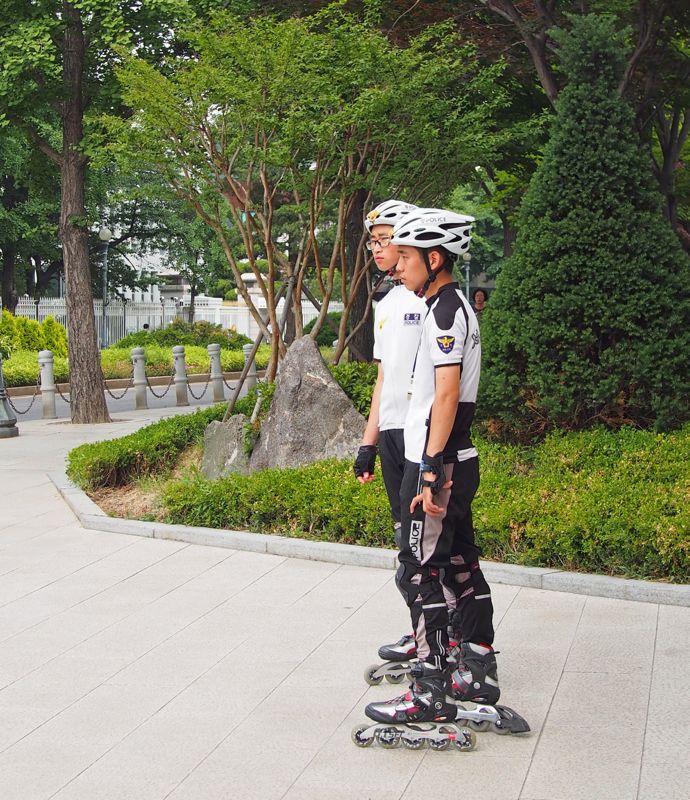
I was amazed to see police on rollerblades in front of the Blue House:


There also seems to be a bicycle police troupe:


I did visit another palace, called Changdeokgung. (The first picture from part 1 (here) of this series is from Changdeokgung.) It's a designated UNESCO World Heritage site, but it's still mostly fake:


These stone markers are used to indicate the rank of the rows of officials, here 9th, leading up to Chong-jon hall:


There are actually stone markers on both sides. Military officials on the left and civil officials on the right. Inside Chong-jon hall:


The palaces are done in classic Chinese style. However there is one interesting detail. Contrast the floor above with the one below:


Because winters are cold in Seoul, and these are living quarters, the floor is finished using paper. Why? Because underneath there is a heating system. People slept on the floor not in beds.

Lest you think I dutifully researched all this information, it all came from this lady, the official English-language palace guide. You're only allowed to tour Changdeokgung in the company of a guide. But I saw people wandering off by themselves.


Part 4 is here.